

Any questions?
User manuals
Origin
The user manual for the Origin model is available to download below:

Orbit
The Orbit user manual is available to download below:

SUNAE mobile application
Any questions about using the SUNAE application? Follow the video below ↓
Use
How long does it take to draw a picture?
The time it takes to complete a drawing varies greatly depending on the complexity of the drawing, the ball speed selected and whether the erase before drawing option has been selected.
The simplest ones take about half an hour, and the most complex ones can take up to 6 hours!
How do you erase the drawing?
It couldn't be simpler! The ball is also responsible for erasing. There are 2 ways to erase:
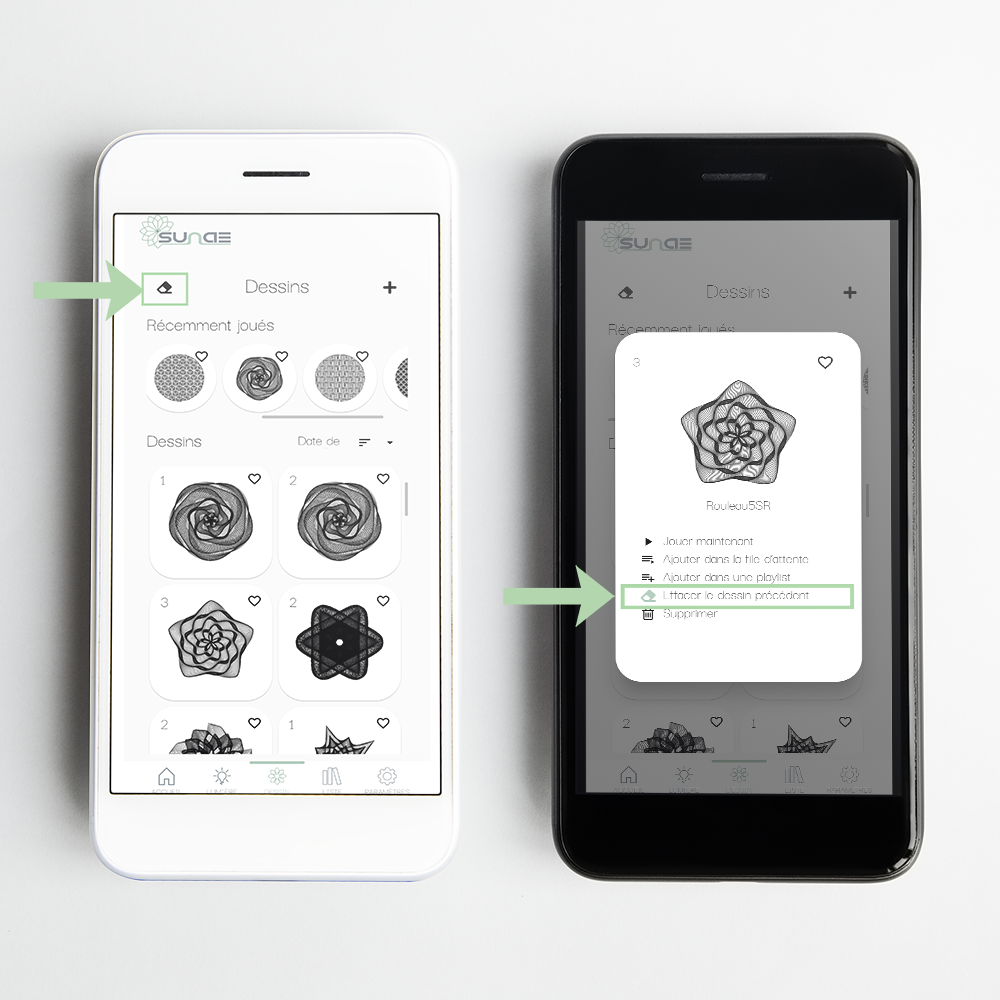
1. Press the eraser button
by pressing the eraser button, the ball will spiral from the outside inwards to give a neutral font to the next design.
2. Activate deletion in the design options
It is also possible to activate the eraser option in the drawing parameters. If enabled (eraser in green), the drawing will automatically be erased before it is played.
How do I connect to the device?
To connect to SUNAE objects, simply download the free application on your apple or android smartphone available from the following links:

Bluetooth technology is used for wireless transfer and control.
Can the device be connected to WIFI?
Yes, but the connection for control is still via Bluetooth technology.
It is possible to connect to local 2.4GHz wifi, which has the following advantages:
- Possibility of setting operating times in the parameters
- Faster downloading of drawings
- Faster object updates

How many drawings are available with the table?
When you receive your table, there are almost 200 designs on it.
You can also regularly download new ones, which we make available to you free of charge via the application and its download centre.
Is it possible to make your own drawings?
Yes.
It is entirely possible to make your own drawings. However, they are still basic drawings, mathematical shapes. Many thanks to Jeff, who has designed a little free online software to help you make drawings. It's available at the link below:
Draw your design, then export it in “.thr” format. Then simply import it into the application via the download centre.
If you would like to create your own logo or a more complex design, simply contact us at the following e-mail address:
Is it possible to change the sand yourself?
Yes, and it's a very quick operation too. Change the colour of your sand from among the 3 available here.
For instructions on the Origin table, follow the video below:
For Orbit, a simple vacuum will do the job.
Are SUNAE appliances connected to the mains?
Yes.
SUNAE devices are connected to the mains. Although it would be possible to place a battery inside, the user would still have to recharge the device every day.
As this is a fixed object and not a mobile one, we preferred to work on the discretion of the small power cable under the table.
Does it consume a lot of electricity?
No.
Power consumption when the table is drawing is just under 5 watts, equivalent to a computer on standby.
When the LED lighting is switched on at 100% you need to add 20 watts on Origin and 10 watts on Orbit. At that point, it will replace an existing light in your room and so you won't consume any more.